PROGRAMMING
PREPARATION
To prepare the radio for programming, perform the following steps:
1. Turn the radio off.
2. Remove the battery.
3. Remove the three black screws from the rear case.
.Two are located on the left side.
.One is located near the PTT switch.
4. Remove one nickel-plated screw from the bottom of the rear case.
This screw is located nearest to the battery release button.
NOTE: Do not remove the other two nickel-plated screws that affix
the battery connections to the bottom of the front and rear cases.
5. With the front case facing you, carefully lift it away from the rear
case and lay it along the right side of the rear case.
The programming switch is located on the small PC board installed
on the channel selector control. The small, slide-type switch is
installed just below the bottom of the control.
6. Slide the trigger on the programming switch up or away from the
PCB installed on the front case. This is its program position.
7. Carefully reinstall the front case onto the rear case.
a. You only need to install one of the three black screws you
removed in Step 3. The best screw to install is the one that was
removed from the upper-Ieft corner.
b. Install the nickel-plated screw you removed in Step 4.
8. Install the battery. The radio is now ready to be programmed.
9. A blank form for recording the information you program into the
radio is provided on page 27. You may copy this form.
A. TO PROGRAM CHANNEL DATA:
1. With small p in display, press the M/S key.
Enter frequency on page 16.
3. Enter three-digit RX CTCSS tone or DCS code.
NOTE:
For CTCSS tone codes see Table 2
For DCS codes, see Table 3.
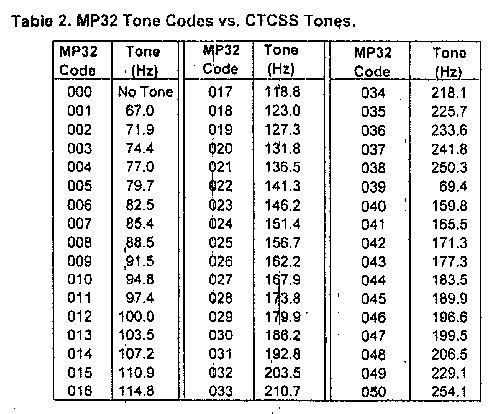

NOTE:
For a non-tone decode (RX) or encode(TX), enter "000" in step 3
or step 6.
4. Enter four RX DTMF tones. (0000 = no tones.)
5. Enter TX frequency. XXX.XXX
6. Enter three-digit TX CTCSS tone or DCS code. XXX
7. Enter four TX DTMF tones. (0000 = no tones.) XXXX
8. Press ENT.
9. Enter two-digit channel number to store the data.
10. Go to step 1 to program another channel.
B.TO PROGRAM CONFIGURATION DATA:
1. With small "P" in the display, enter the
6 Selection Codes per Table B:
a. Enter RCC Mode's Code.
b. Enter SCAN/RCC DELAY's Code.
c. Enter TIME OUT TIMER's Code.
d. Enter BCL's Code.
e. Enter DTMF ENCODE'S Code:
f. Enter Channel Selector Lock's Code.
2. Press ENT Key.
3. Enter "00" to store Configuration Data.
C. TO PROGRAM ANI CODE:
1. Wrth small-"P" in the display, press ENT
and then A/D.
2. Enter the 1 to 7 digit ANI.
3. Press ENT to store the ANI.
D. TO REVIEW DATA:
,
1. With small "P" in display. press PRI Key.
2. Enter a 2-digit Channel Number.
a. Enter 00 for Configuration Data.
b. Enter " 01" to "32" for Channel Data.
c. Enter ."0#" for Unit's ANI.
NOTE: All times (Delay and Timer) are in seconds.
dis. = disabled
enl. = enabled
FP = First PTT press
EP= Every PTT-press
For proper SELECTIVE CALLING operation. use
EP selection.
REMINDER: To place an operational Unit in Review
Only Mode, with the Unit on, hold down the FUNC
button and press the M/S Key. No changes can be
made in this mode.